
Most discussions around DAX Query View eventually lead to the same question: "Do I still need DAX Studio?"
It's a fair question. In last week's BI Bits edition, I shared how DAX Query View has become one of my go-to tools for validating calculations and debugging Power BI models. Naturally, many readers asked where DAX Studio still fits.
After using both extensively, I've realised they're not competing tools, but they're answering different questions.
The biggest improvement in my investigation workflow didn't come from learning another feature or tool. It came from knowing what I was trying to validate first. Once I started thinking that way, deciding when to use DAX Query View and when to switch to DAX Studio became much easier.
In this blog
- Why debugging should start with the question, not the tool
- How I use DAX Query View to validate measures and filter context
- When I switch to DAX Studio for performance troubleshooting
- The investigation workflow that changed how I investigate Power BI models
My Investigation Workflow
One lesson that has stayed with me throughout my Power BI journey is that the same symptom can have multiple causes.
One thing I've learned over the years is that a reported KPI issue is rarely enough to tell you where the actual problem is.
A message like "This number looks wrong" could point to the calculation, the filter context, the report itself, or even a performance issue. That's why I don't start by deciding which tool to open but I start by deciding what I'm trying to validate.
Over time, that simple change has given me a much more structured way to investigate Power BI models.
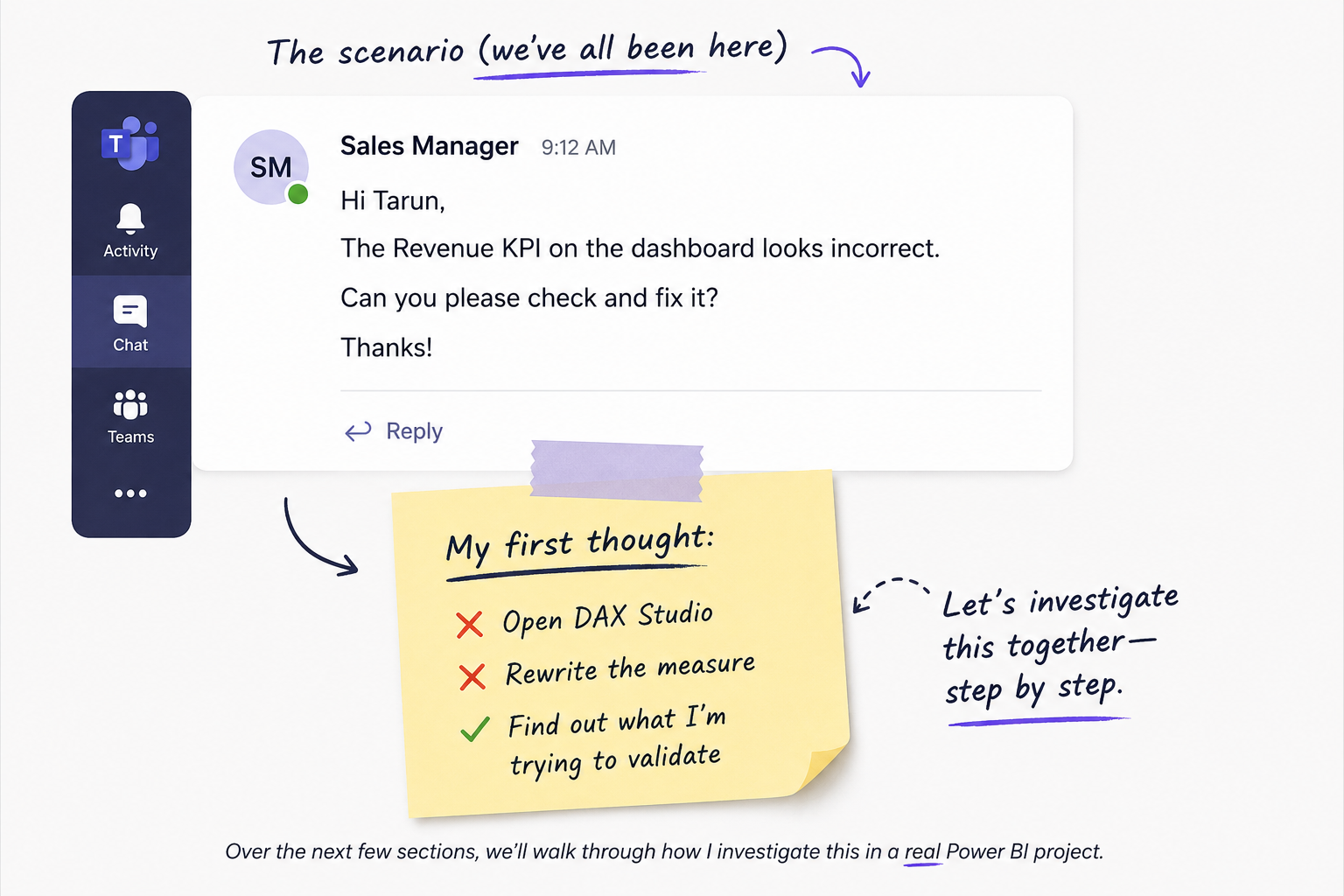
Whenever I receive a message like this, I don't jump straight into the DAX. I work through the same sequence of questions every time.
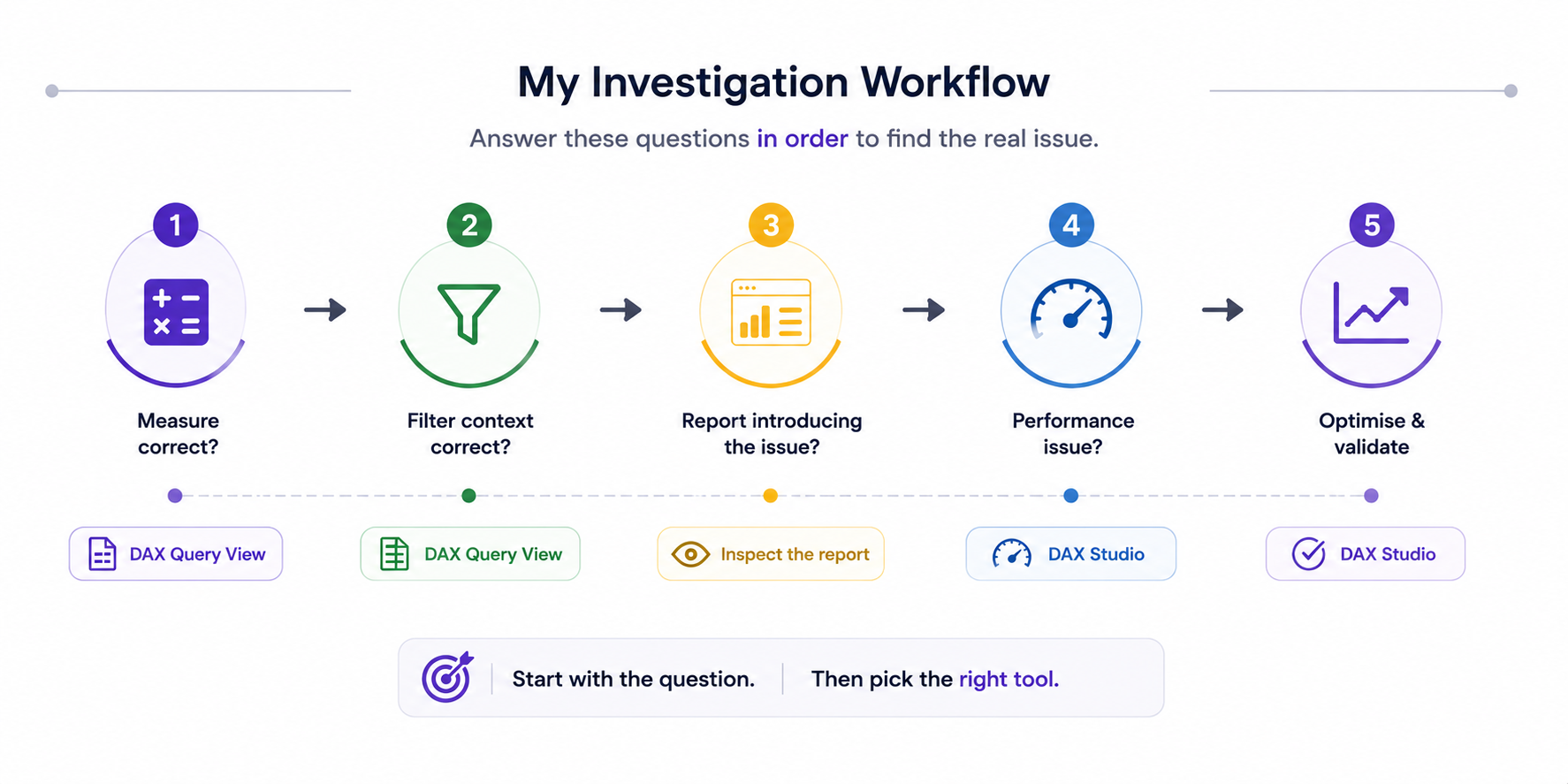
Let's start with the first question I try to answer during almost every investigation.
Is the Measure Actually Wrong?
On larger enterprise Power BI models, it's surprisingly easy to spend hours debugging a measure simply because someone reported a number they weren't expecting. My instinct used to be to jump straight into the DAX because it felt like the most obvious place to look. More often than not, I was investigating the wrong layer.
These days, I almost always start with DAX Query View, but not because I'm trying to fix the measure. I'm trying to prove whether it deserves my attention in the first place. I validate the measure outside the report, recreate the filter context the stakeholder is using, and compare the result against the expected business logic. If everything checks out, I stop looking at the DAX and move on. Finding out the measure isn't the problem is still progress because it tells me exactly where not to spend the next hour.
Rule out the measure before you try to improve it
Proving the DAX isn't the problem is often the fastest way to narrow your investigation.
Is Filter Context Changing the Result?
Once I'm confident the measure is behaving as expected, I stop questioning the DAX and start questioning what the report is asking the model to calculate.
I've lost count of how many times someone has reported an "incorrect" KPI, only to discover we weren't actually comparing the same scenario. The calculation hadn't changed, but the question we were asking the model had. One user might have a different slicer selected, another might be looking at a different level of detail, or a page interaction could be filtering the visual without anyone noticing.
This is where I turn to DAX Query View again. I recreate the stakeholder's scenario by applying the same filters and comparing the output against another context. Within a few minutes, I can usually tell whether the measure is behaving exactly as expected or whether something else is influencing the result. More often than not, the DAX isn't the issue, but it's the way the measure is being evaluated.
Compare like-for-like before questioning the calculation
An unexpected KPI often comes down to different filter contexts rather than incorrect DAX.
Is the Report Introducing the Problem?
Once I've ruled out the measure and the filter context, I spend a few minutes looking at the report itself. Over the years, I've found that some of the quickest fixes have nothing to do with DAX but they come from spotting something the report is doing that users don't expect.
A hidden filter, an unexpected visual interaction, a field parameter, or even a comparison of visuals at different levels of granularity can all make a perfectly valid measure look incorrect. Before I touch the calculation again, I make sure the report is telling the same story the business expects to see.
Don't confuse report behaviour with calculation errors
Sometimes the quickest fix isn't in the DAX but it's in how the report is presenting the result.
When DAX Studio Becomes the Better Tool
By this point, I've usually answered the logical questions. I know the measure is correct, the filter context makes sense, and the report isn't introducing anything unexpected. If users are still unhappy, the conversation has almost always shifted from "Is this number correct?" to "Why is this page taking so long?"
That's the point where I close DAX Query View and open DAX Studio.
I'm no longer trying to understand the calculation but I'm trying to understand the execution. Rather than guessing which measure or visual is responsible, I start with Performance Analyzer to identify the slowest visual on the page. I then analyse that specific query in DAX Studio using Server Timings and the Query Plan to understand where the bottleneck is and whether my optimisations are actually making a measurable difference. If you'd like to dive deeper into Server Timings, I've covered that in a previous article.
Understand the execution, not just the calculation
Once the logic checks out, shift your attention to how Power BI is executing the query.
Earlier in my career, I used to think better tools would make me a better troubleshooter. Over time, I realised the opposite was true. Better questions made me choose the right tool.
That's the mindset I try to follow today. I don't start by asking, "Should I open DAX Query View or DAX Studio?" I start by asking, "What exactly am I trying to prove?" More often than not, the answer to that question determines the rest of the investigation.
Validate first. Optimise second.
I don't optimise a measure until I'm confident the logic is correct.
- Wrong result? → DAX Query View
- Slow report? → DAX Studio
Closing Thoughts
Looking back, I don't think DAX Query View made me a better troubleshooter, and DAX Studio didn't magically solve my performance problems.
What changed my workflow was learning to separate logic from performance. Instead of opening a tool immediately, I first decide what I'm trying to validate. Once that question is clear, choosing the right tool becomes surprisingly straightforward.
That's probably the biggest lesson I've taken away over the years. Better tools certainly help, but asking better questions has had a much bigger impact on how I investigate Power BI models.
Comments
Join the discussion below (GitHub login required), or share your thoughts on LinkedIn . I’m most active there.