The dashboard is finally live. The business signs off. The report is published. The project closes.
Most projects stop there. Enterprise BI doesn't. In last week's BI Bits edition, I wrote about why great dashboards still fail. This time, I want to look at everything that happens after deployment because that's where dashboards begin to prove their value.
Inside this article
- Why deployment is only half the dashboard journey
- What Hypercare teaches you after go-live
- How I decide where the next development sprint should go
- Reading the story behind feature requests
- The dashboards nobody plans to retire
The Enterprise Dashboard Lifecycle
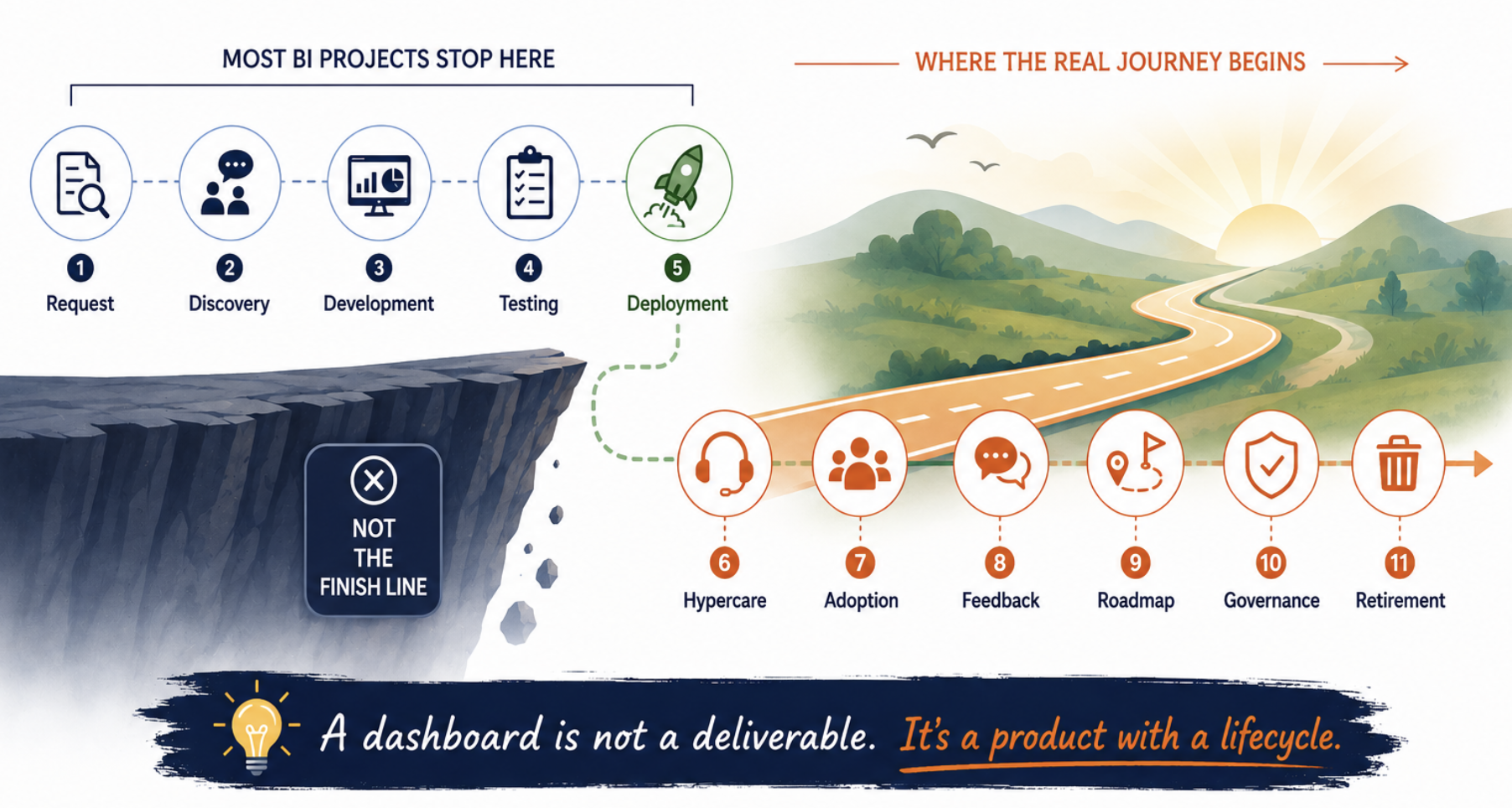
Most dashboard projects focus almost entirely on getting to deployment. Once the report is published, it's tempting to think the work is finished. In enterprise BI, that's rarely true.
Deployment simply marks the point where real users begin interacting with the product. That's when assumptions are challenged, enhancement requests start arriving, adoption patterns emerge, and business priorities begin influencing the next version of the dashboard. Looking back, I've realised that this second half of the lifecycle often determines whether a dashboard becomes genuinely valuable.
Requirements describe expectations. Hypercare reveals reality.
The most valuable product insights rarely come from workshops. They emerge once the dashboard becomes part of everyday work.
Hypercare: Where Assumptions Meet Reality
Every dashboard is built on assumptions.
We assume users will navigate the report in a certain way. We assume the KPIs we've prioritised answer the most important business questions. We assume permissions, performance, and business context have all been covered during development and testing. Then the dashboard goes live.
That's usually when the business starts writing Version 2. People don't use the dashboard the way we expected. They ask different questions, ignore pages we thought would become favourites, request features nobody mentioned during workshops, and sometimes solve problems we never designed the dashboard for.
That's why I think Hypercare is one of the most valuable phases of the entire lifecycle. Before making any changes, I spend time understanding what's actually happening in production. Usage Metrics, refresh history, access requests, stakeholder conversations, and the first wave of enhancement requests all help paint a picture of how the dashboard is really being used.
Products don't fail because of bad assumptions. They improve because assumptions get challenged.
Hypercare isn't about fixing bugs. It's about discovering where reality differs from the assumptions you made during development.
The Questions Change Over Time
One thing I've learned is that my job after deployment isn't simply maintaining a dashboard but it's deciding where to invest next.
A few weeks after release, I revisit the dashboard with three questions in mind. Is it being used? Is it solving the problem it was built for? Is it worth another development sprint? The answers rarely come from a single place. I review Power BI Usage Metrics to understand adoption, look through the enhancement requests that have accumulated during Hypercare, and speak with the business owner to understand what's changed since deployment.
One mistake I made early on was assuming that every dashboard should keep evolving. Experience taught me otherwise. Some dashboards need another development sprint because the business has moved on.
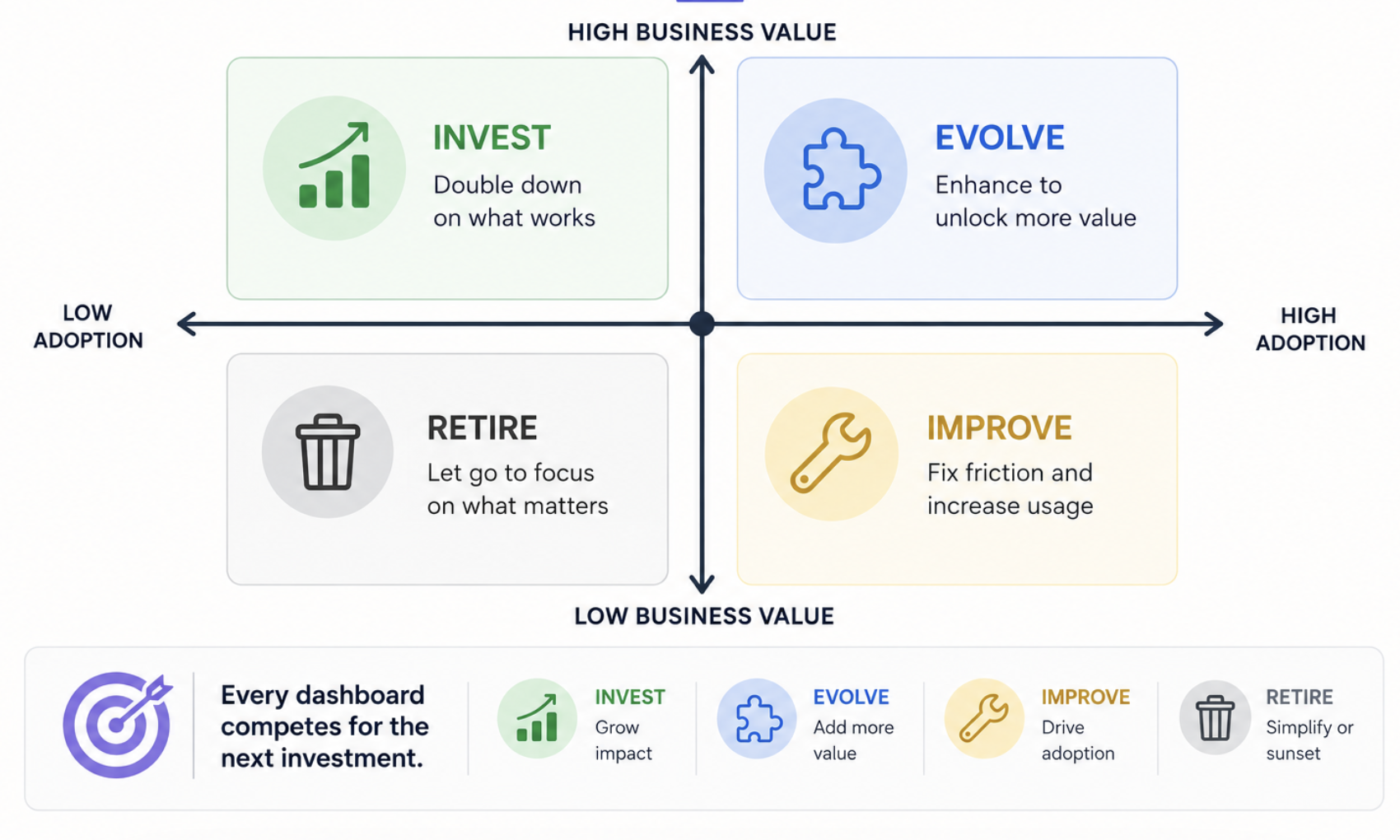
The goal isn't to keep adding functionality. It's to make deliberate decisions about where the next investment will create the greatest value.
Every dashboard competes for the next development sprint.
I no longer assume every dashboard deserves more features. It has to earn the next investment by continuing to solve a meaningful business problem.
Every Enhancement Request Tells a Story
One lesson enterprise BI has taught me is that enhancement requests are rarely about the feature being requested.
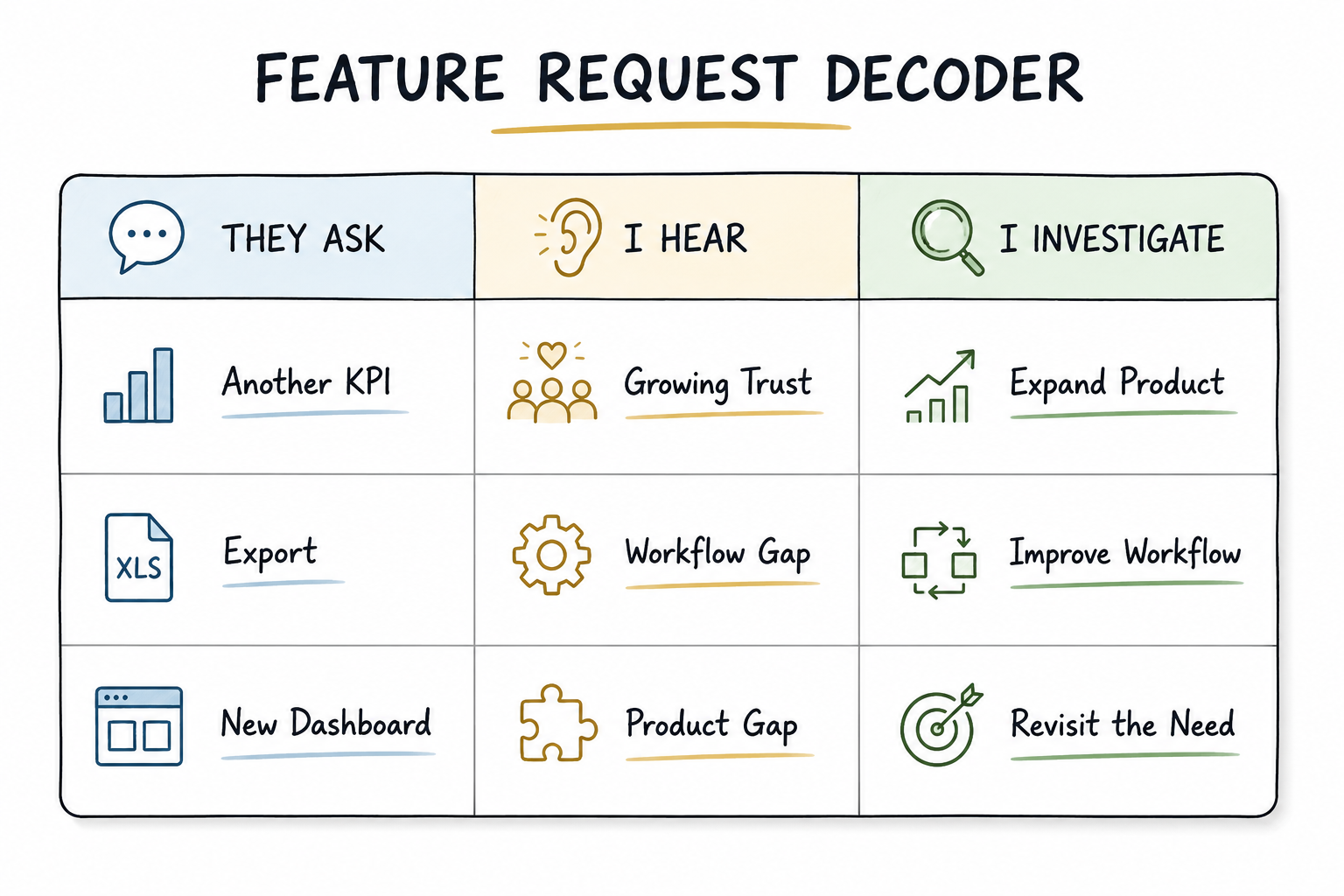
On the surface, someone might ask for another KPI, an export button, or a new page. It's tempting to treat those as isolated tasks and add them straight to the backlog. Over time, though, I've found that the request itself is often just the symptom. The more interesting question is what prompted it in the first place.
An export request might indicate that the dashboard isn't fitting into an existing business process. A request for another KPI could suggest that users trust the dashboard enough to expand its role in decision-making.
Even repeated requests for a brand-new dashboard sometimes point to a more fundamental issue: the existing product isn't answering the business question people are actually trying to solve.
I've learned that users usually bring solutions rather than problems. They tell me what they think they need. My job is to understand the business problem behind the request before deciding what to build. More often than not, that leads to a better solution than simply implementing the feature that was originally requested.
Users ask for features. Products solve problems.
The request is only the starting point. The real work begins when you understand the business need behind it.
The Dashboard Retirement Nobody Plans For
Every enterprise BI environment accumulates dashboards. Very few intentionally reduce them.
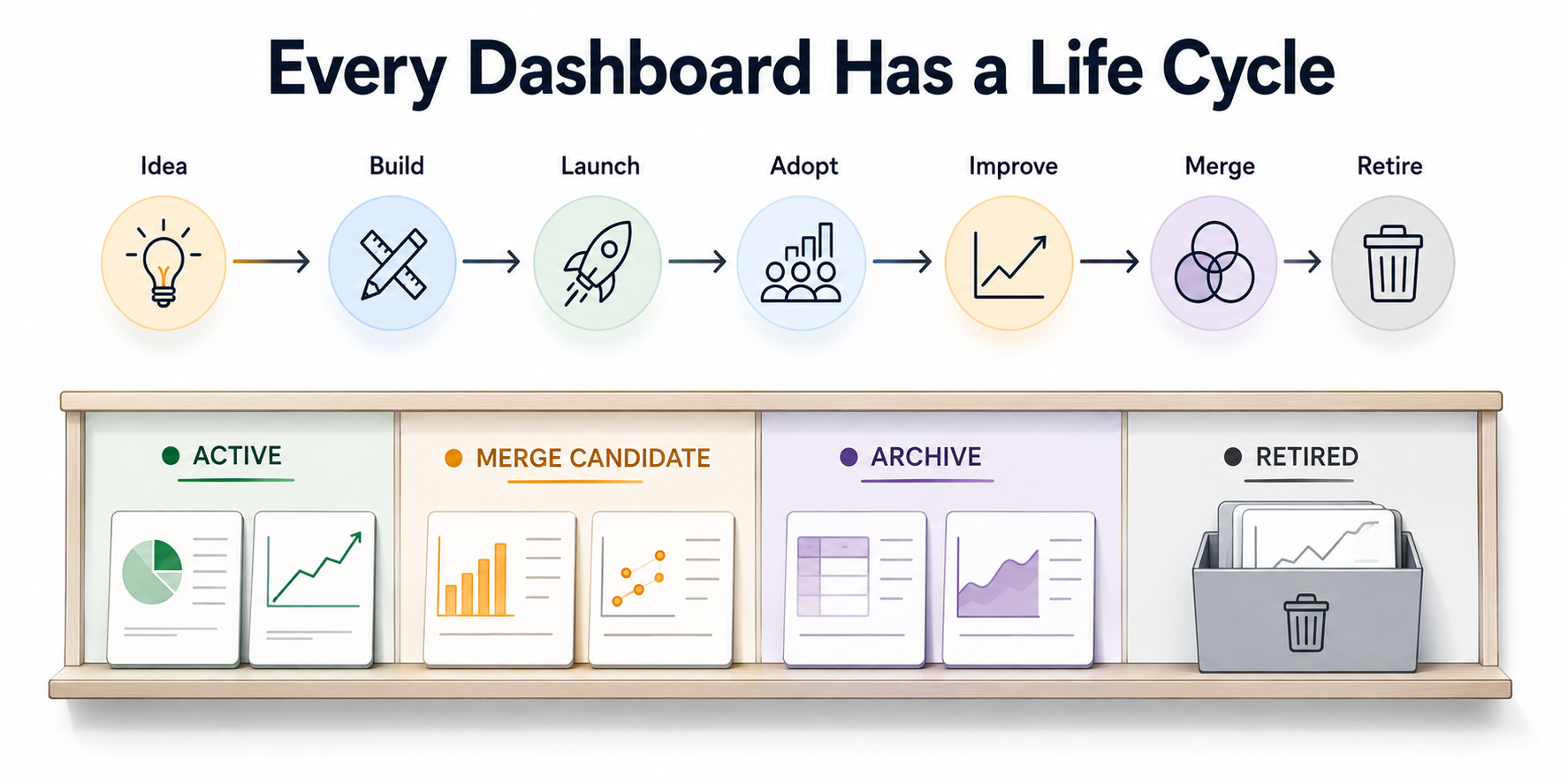
Every new dashboard solves a business problem, but it also introduces another product to maintain, support, and govern. Over time, business priorities change, KPIs evolve, teams reorganise, and new dashboards appear. Before long, multiple reports begin answering similar questions. None of them are technically wrong, but together they make it harder for the business to know which one to trust.
One lesson I've learned is that building dashboards isn't what makes an enterprise BI environment difficult to manage. It's deciding when a dashboard has reached the end of its useful life. Retirement isn't a sign that a dashboard failed. More often, it's a sign that the business has moved on.
Perhaps dashboard retirement should become a regular product conversation rather than an exceptional one. Every new dashboard adds complexity to the reporting landscape, and retirement is one of the few ways we can reduce it.
Retiring a dashboard isn't admitting failure.
Sometimes it's the clearest sign that the business has evolved and the reporting landscape needs to evolve with it.
Closing Thoughts
The more time I spend working with enterprise dashboards, the less interested I become in the dashboard itself. What interests me now is everything around it: the conversations it starts, the decisions it influences, the feedback it generates, and how it evolves long after deployment. That's where I think the real challenge of enterprise BI begins.
Looking back, I don't think the biggest lesson enterprise BI taught me was how to build dashboards. It taught me what happens after deployment. Maybe that's why I no longer think of dashboards as projects. They're products.
Comments
Join the discussion below (GitHub login required), or share your thoughts on LinkedIn . I’m most active there.