
What if most dashboard feedback could sort itself out before the BI team even looked at it? That’s what I wanted to test this week.
In the last BI Bits edition, I looked at what happens after someone clicks the feedback button. This time, I wanted to see how far we could take the next part. Could the feedback arrive with enough context to tell us where it came from, who should see it, what it might be about, and whether we’ve seen something similar before?
That sounds simple enough. But once I started working through it, the feedback form quickly became the least interesting part.
Inside this article
- How much should we really ask the user?
- Why I wouldn't build one big feedback page
- Where does the feedback actually go?
- Can we make the messy sorting happen automatically?
- One Revenue mismatch. How far could the problem go?
- What would I actually build first?
What Does the User Actually Need to Tell Us?
I started by listing everything that would be useful to have with a piece of feedback: the report, page, user, filters, what they were trying to do, and of course the feedback itself. It looked great on paper. It also looked like a form nobody would want to fill in.
×
So I cut it back. For now, I really need the user to tell me two things: what are you trying to do, and what should we look at? If I can reliably bring the user, report, and timestamp with the submission, even better. Page and filter context would be useful too, but I wouldn't hold up the first version trying to make that work everywhere.
That still won't prevent a “this number looks wrong.” But I don't think the answer is another mandatory field. Every question we can answer without asking the user is one less reason for them to abandon the feedback altogether.
One Entry Point or Many?
A central feedback page sounds cleaner to maintain, but it asks the user to leave the report, find the feedback page, and then remember what they were looking at. That might work for broader suggestions, but I wouldn't rely on it for feedback that happens while someone is actually using a dashboard.
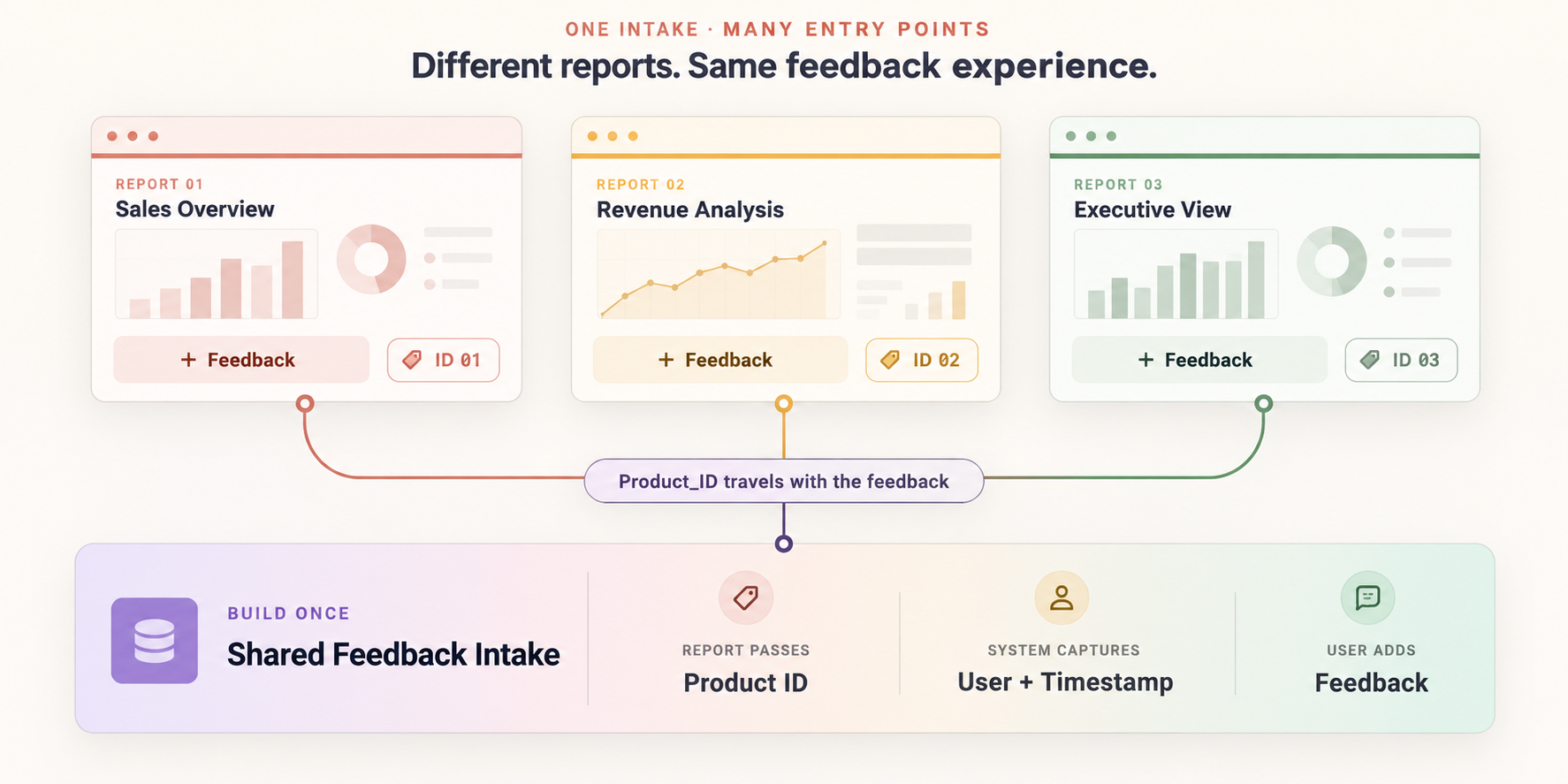
So I'd keep the feedback entry point inside the reports, but not build a separate process behind each one. The same button can open a centrally managed intake and pass the report identifier with it. The entry points are distributed; the feedback flow behind them isn't.
Give the Feedback Somewhere Useful to Live
At this point, the user has clicked the button, added some context, and submitted the feedback. Now we need somewhere to put it. Not just somewhere to store the message, but somewhere we can keep adding to it as it moves through the process.
I’d use a central feedback store and keep two things clearly separated: what the user actually submitted and what we add afterwards. The original feedback stays untouched; report context, classification, owner, status, and eventually the decision or outcome build around it. If we later use AI to summarise or classify a submission, that should be an addition to the record, not a replacement for what the user said.
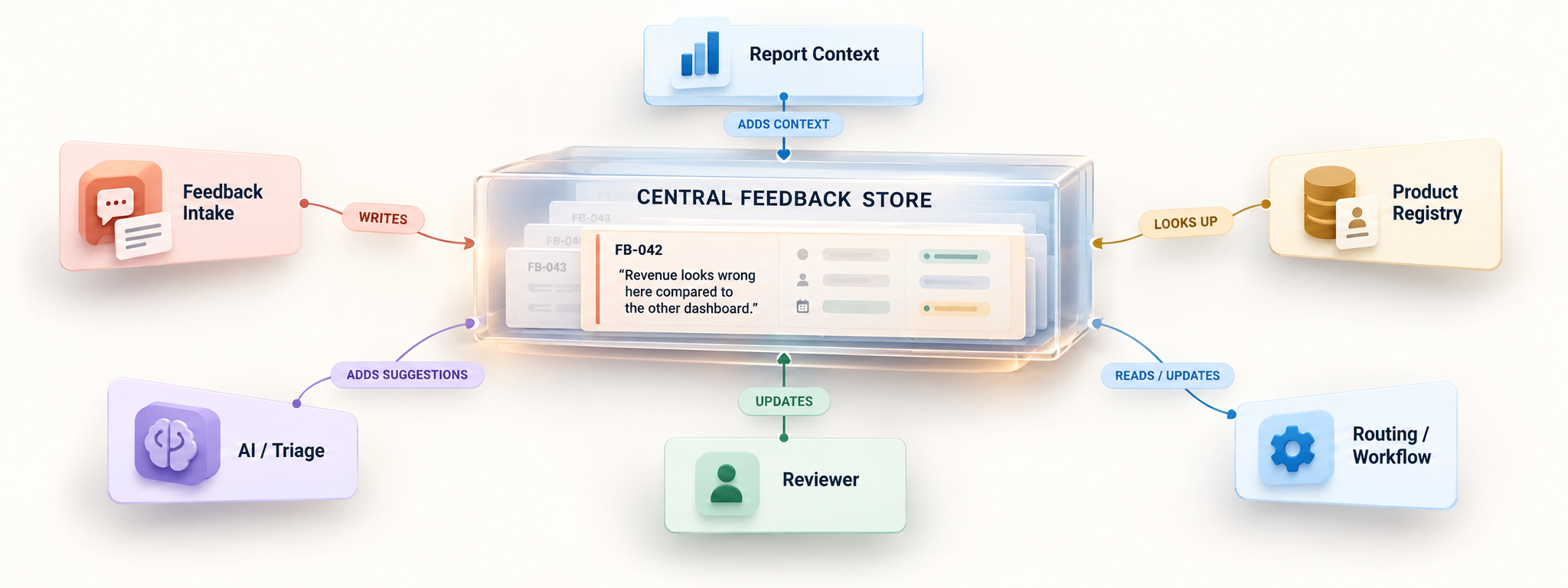
I’d also avoid designing the store around the first version of the form. The intake will change, and the routing probably will too. A simple structure such as submission → context → triage → decision → outcome gives us enough room to evolve without trying to design the final version on day one.
Make the Routing Do Some Actual Work
Now we can connect the pieces. Our feedback is sitting in the central store, so the next step is an automation that runs whenever a new submission arrives. You can build this in Power Automate, Logic Apps, n8n, or a similar workflow tool. For this setup, the automation has three jobs: add context, understand the feedback, and decide where it should go.
to the decision.
Start with the things we already know. Use the report or product identifier captured earlier to look up its owner and routing destination from a small mapping table. Keep this outside the automation itself — Product → Owner → Destination is enough to start. If no match exists, mark it as Unmapped and send it for review rather than trying to guess an owner.
Next, pass the written feedback through an AI model with a deliberately narrow task. Ask it for a suggested category such as Question, Data Quality Issue, Bug, Improvement, or Requirement, along with whether there is enough information to understand the request. If the answer is unclear, keep it that way. “The numbers look wrong” should come back as needing more context rather than being confidently turned into a bug.
Then check the central store for recent feedback from the same product that looks similar. At first, even a simple keyword or text search is enough; more sophisticated matching can come later. Surface those records as possibly related, but don't merge them automatically. “Export this table” and “I need the underlying data in Excel” might describe the same problem, but that's something the reviewer should confirm.
One extra field is worth adding from the beginning: Reviewer Correction. If the system says Bug and the reviewer changes it to Data Quality Issue, keep that correction. After enough submissions, those corrections tell us where the automation is genuinely helping and where it still gets things wrong.
Now Let’s Test It With a Real BI Problem
Let’s say the first feedback we receive is: Revenue on this dashboard doesn’t match the other report.
If our setup only knows about the feedback and the report it came from, there isn’t much clever routing it can do. To go further, we need one additional piece: a lightweight product and metric registry connecting our reports to their owners, semantic models, and key metrics. It doesn’t need to be a perfect enterprise catalog, but the relationships need to exist somewhere.
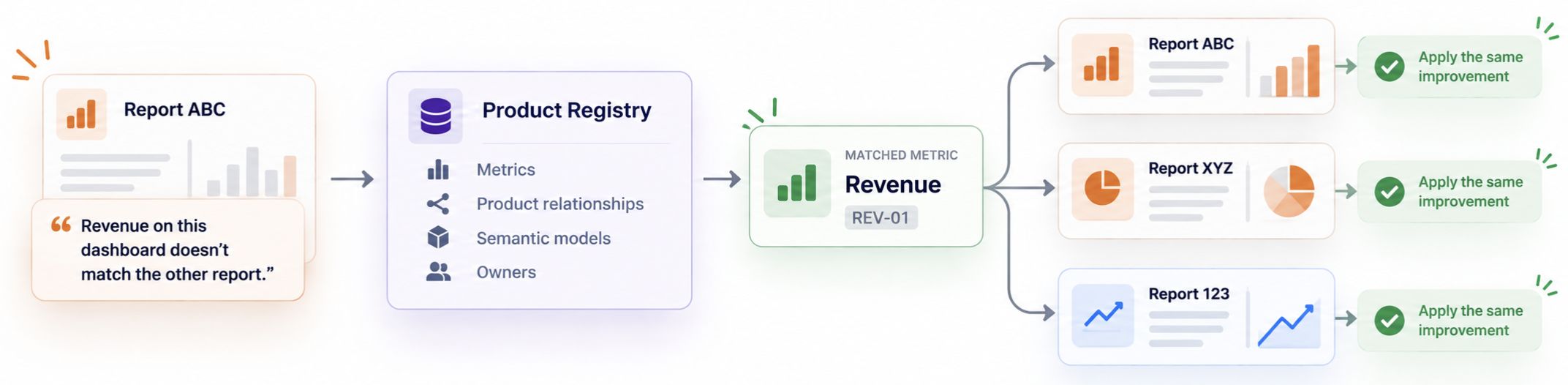
Now the first Revenue complaint can trigger a wider check. The flow can look up the metric and find that Revenue appears in several other reports. Some might share the same semantic model, while another has its own calculation. Instead of waiting for more complaints, we already know which products could be affected and where the definitions or data paths start to differ.
At that point, I wouldn’t create separate issues for every report. I’d open one investigation, link the affected products and owners, and keep the findings together. Any new Revenue feedback can then be attached to the same investigation rather than starting from zero again.
There is one catch: matching on the word Revenue isn't enough. Different measures can have similar names without meaning the same thing. If we want this to become reliable, the registry eventually needs a stable metric identifier that tells us which reports are genuinely using the same business metric.
That’s an important addition to the architecture. The feedback tells us where someone noticed the problem; the registry tells us how far that problem might travel.
What I’d Actually Deploy First
I’d start with a small group of actively used reports, but choose them deliberately: reports that share a metric, a semantic model, or an audience. That gives the loop something meaningful to connect from day one. For those reports, I’d create the minimum registry — Product → Owner → Semantic Model → Key Metrics — add the same feedback entry point, and send everything into one central store.
For the first automation, I only want to answer four questions: Where did this come from? Who owns it? What does it appear to be about? Is there enough information to act on it? If we can answer those reliably, we already have something useful. I wouldn't start with automatic backlog creation, detailed report-state capture, or sophisticated matching. Those can make the first version look more impressive without necessarily making the feedback loop more useful.
5 BUILDING BLOCKS
Product_ID
FB-001
Original feedback
+ context
Then I’d let the manual work expose what to automate next. If reviewers repeatedly search for similar feedback, build the matching. If they keep tracing the same metrics across products, expand the registry. If the same handoff happens every time something is accepted, automate it. I’d rather automate a bottleneck I can see than one I imagined while designing the architecture.
Closing Thoughts
I think a feedback loop like this becomes more useful with time, but probably not because the automation gets smarter. It becomes useful because patterns start to show up. The same metric keeps getting questioned, the same report creates the same workaround, or what looked like a dashboard issue keeps leading back to the same data or process problem. At that point, feedback starts telling us something about the product landscape, not just the individual request.
But I’d be careful about how far we take that. More feedback doesn’t automatically mean something deserves to be built, and automation can’t make that judgement for us. The system can help us connect the signals. Deciding which ones are worth acting on is still the important part.
Comments
Join the discussion below (GitHub login required), or share your thoughts on LinkedIn . I’m most active there.